JetPallet Try it free

For packaging buyers and logistics in mid-sized companies

Is a different carton size worth it – counted all the way to the truck?

A carton a few millimetres smaller can add a layer to the pallet – or change nothing at all. JetPallet follows the option from product dimensions through the shipper and the pallet to the cargo space and sets the result beside what you do today: cartons per pallet, pallets per truck, cost per unit.

What you end up with

  • Option comparison as PDF with an evaluation page
  • Scenario report as PDF with all inputs
  • PDF packing report with costs, company logo and order number
  • Vehicle load plan as PDF
  • CO₂e scenarios as JSON or CSV with factors and sources
  • Shipper and product size proposals as JSON or CSV

Why the spreadsheet stops here

Most companies keep a well-maintained Excel file: carton dimensions, units per carton, cartons per pallet. It answers the question that was asked when the item was set up. It doesn’t answer the next one – what happens if the supplier offers a different carton, the product height changes, or the pallet needs to be 1,200 × 1,000 mm instead of a Euro pallet?

At that point, stacking patterns have to be found again, height and weight limits rechecked and truck loads recounted. By the time that’s done by hand, the decision has often been made already – on the carton’s unit price rather than on the cost per product sold.

1200 mm800 mm1410 mm
Single-SKU pallet: 40 cartons in 5 layers with tier sheets, edge protection and strapping. Illustration, calculated with this page’s web calculator.

Workflow

How you work with JetPallet.

  1. 1

    Set up today’s situation as a project

    Enter product dimensions, shipper carton, weight, pallet and limits – or load your existing cartons into the stock carton library from a CSV file. This is the baseline for every comparison.

  2. 2

    Generate alternatives

    The shipper calculator proposes carton sizes from the product dimensions. The product size comparison varies the product’s dimensions within limits you approve. In the scenario lab you keep up to 4 independent planning states side by side.

  3. 3

    Weigh costs and objectives

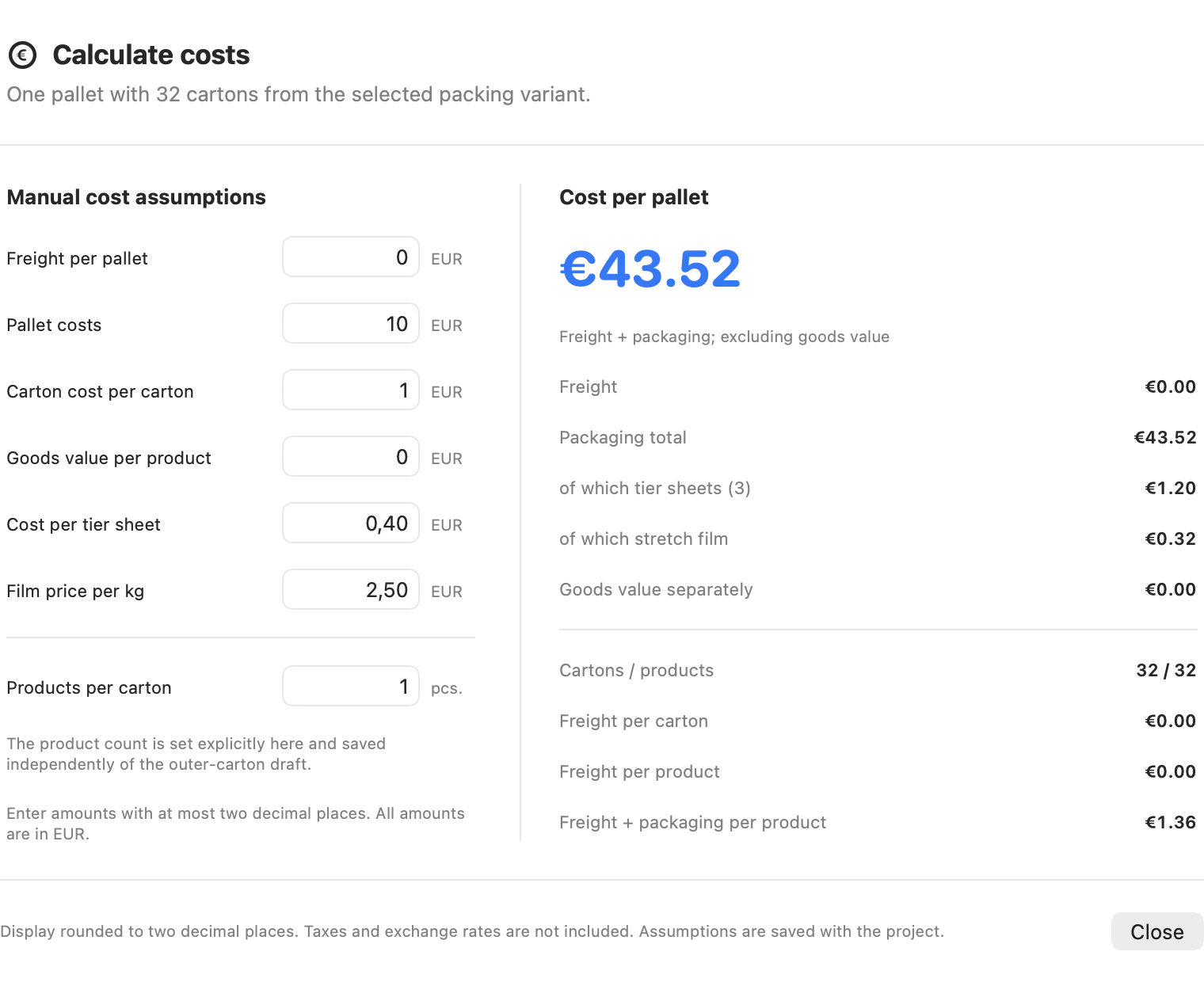
    With your figures for freight per pallet, pallet cost and cost per carton, JetPallet works out packaging and freight cost per product. The option comparison shows which solutions do well on several objectives at once and lets you weight them.

  4. 4

    Follow it through to the vehicle

    Reverse planning runs from the product to the vehicle: how many pallets the order needs and how they fit into a truck or container. The cheapest-vehicle choice uses your cost per trip and per kilometre; it is exact for small cases and marked as an approximation for larger ones.

  5. 5

    Document the result

    The option comparison and scenarios go to purchasing, management or suppliers as PDFs – with your logo, order number and every input, so the figures can be traced.

In detail

In detail

01

Shipper cartons from product dimensions

Product size, units per carton and wall thickness produce carton proposals, each rated by products per pallet. “Check current carton” tells you whether a carton you already stock holds the required quantity. More under carton optimisation.
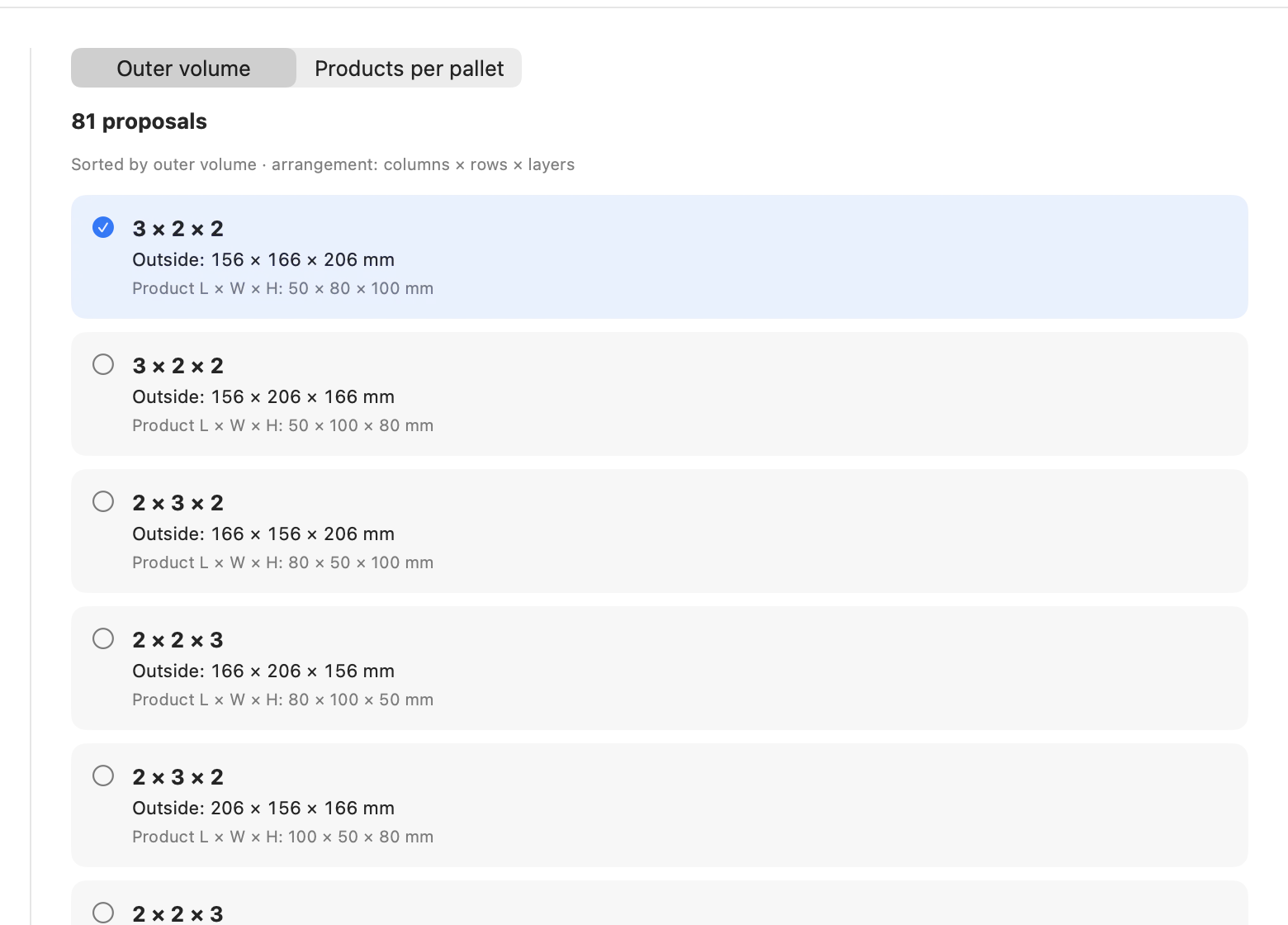
Shipper cartons from product dimensions
Actual JetPallet interface.

02

Patterns that use more of the deck

A 350 × 250 mm carton gives 9 per layer on a Euro pallet in a simple grid and 10 in a two-block pattern. JetPallet finds patterns like this on its own and checks each layer geometrically. Whether it pays off for you is shown in the cost view.

1200 mm800 mm350 mm350 mm250 mm250 mm350 mm350 mm
Layer plan: carton 350 × 250 mm on 1200 × 800 mm – 10 per layer. Drawn by this page’s web calculator.

03

Options side by side

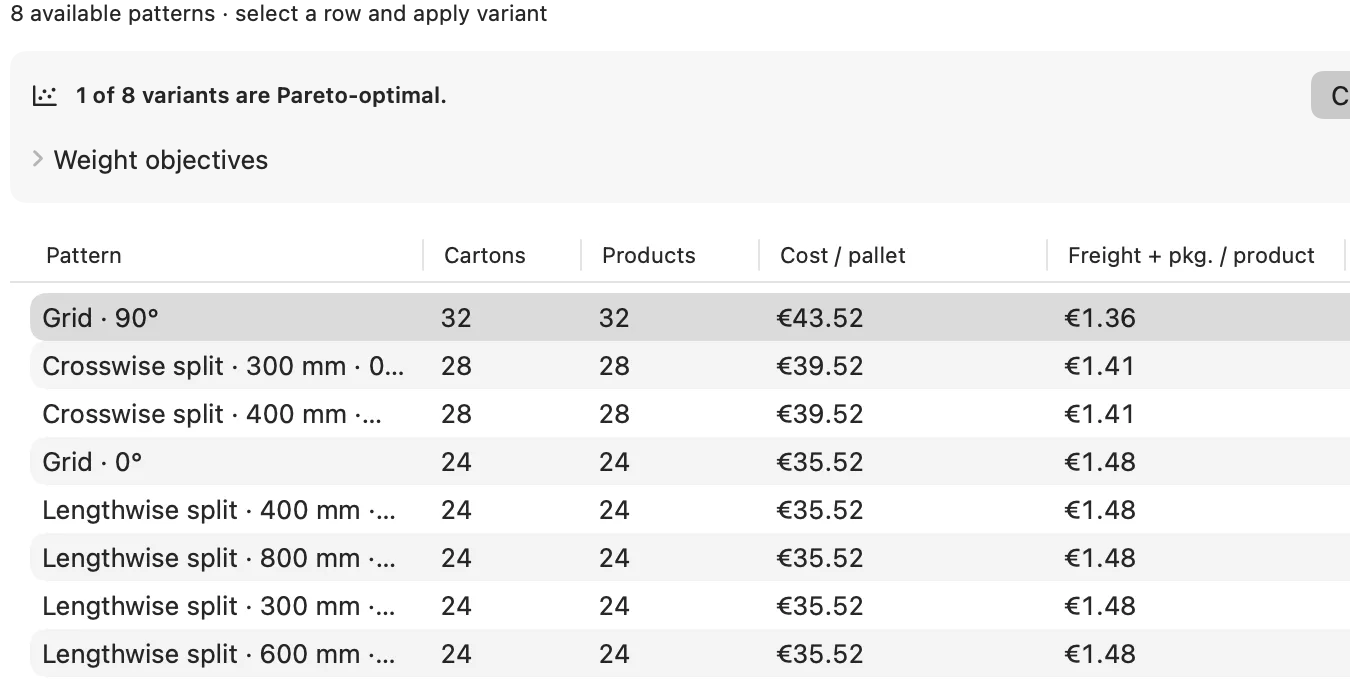
The option comparison lines up patterns and carton sizes and highlights the solutions that are not worse than any other on every objective. The comparison PDF includes an evaluation page.

Options side by side
Actual JetPallet interface.

04

Cost per unit from your own figures

You enter freight per pallet, pallet cost, cost per carton and goods value per product. From these come packaging cost, freight per product and total cost per product, with tier sheets and stretch film if you use them. CO₂e scenarios use traceable factors and sources. See cost and CO₂e.

Cost per unit from your own figures
Actual JetPallet interface.

05

Estimate compression strength before you order

A smaller carton or a taller stack changes the load on the bottom carton. JetPallet estimates compression strength with the simplified McKee formula; a measured BCT value from your supplier takes precedence. More under box compression strength.

Questions

Frequently asked questions.

We already have a spreadsheet for this. Why another tool?

The spreadsheet stores results; JetPallet recalculates them. When a dimension changes, the app finds new stacking patterns, rechecks height and weight and recounts the truck load. Existing carton lists and packing lists can be imported as CSV or XLSX.

Does JetPallet know freight rates?

No. Freight per pallet and cost per trip or kilometre come from your quotes. JetPallet applies them consistently down to cost per product.

Can I send the result to a supplier?

Yes. Option comparison, scenarios, packing report and packing instruction are available as PDFs with your logo, order number and reference, in A4 or US Letter.

Test your carton against one alternative

Free for 14 days, then USD 99 a year, with no separate editions. For several workstations, please ask via the contact page.

Try it free

Free for 14 days · then USD 99/year

Try it free14 days freeUSD 99/year