JetPallet Try it free

Use case · Packaging

Optimise your shipping carton – from product size to a full pallet

The right outer carton size follows from product dimensions, units per carton, clearance and wall thickness: on each axis, count × product size + gaps + 2 × wall thickness. Which of the possible arrangements is best, though, only becomes clear on the pallet. JetPallet does both together: it generates the carton variants and ranks each one by products per pallet.

A size that divides the pallet evenly

1200 mm800 mm300 mm300 mm300 mm300 mm400 mm400 mm
Layer plan: carton 400 × 300 mm on 1200 × 800 mm – 8 per layer. Drawn by this page’s web calculator.

Workflow

How it works in JetPallet.

  1. 1

    Describe the product

    In the carton designer, enter the product dimensions, the units per carton (1 to 1,000), clearance and wall thickness. Optionally allow up to six product orientations.

  2. 2

    Generate carton variants

    JetPallet builds every rectangular arrangement with exactly that unit count and lists up to 100 size combinations, sorted by outer volume and surface area.

  3. 3

    Compare by products per pallet

    For each variant, the pallet planner runs with your pallet, height and weight limits. The list is sorted by products per pallet; variants that do not fit stay visible with the reason.

  4. 4

    Check stock cartons

    Add the cartons you already have or import them from CSV/XLSX. JetPallet checks whether the product fits in a uniform grid, including partly filled cartons.

  5. 5

    Apply

    You apply the chosen variant to the pallet plan explicitly. Only then do the carton dimensions and the pattern in the project change, as a single step you can undo.

The smallest carton is not automatically the best

Twelve products can be packed as 2 × 2 × 3, 3 × 4 × 1, 6 × 2 × 1 and other arrangements, each in several orientations. Every variant gives a different outer size. A carton with little volume can still tile the pallet badly, while a slightly larger one fills the layer completely.

Then there are stock cartons. Often the real question is not “Which carton would be ideal?” but “Does the product fit a carton we already have – and how many units?”. And sometimes it pays to look at the product itself, when a slightly different product geometry puts noticeably more units on the pallet. By hand, you only ever work through a few variants.

What you end up with

  • Carton variants with outer size, arrangement and products per pallet
  • Check result for each stock carton with occupied and empty slots
  • Right-sizing suggestions compared with the starting point
  • Right-sizing results as JSON or CSV
  • Hand-over to pallet planning, costs and reports

In detail

In detail

01

Carton designer with a transparent formula

Outer size per axis = count × product size + (count − 1) × clearance + 2 × wall thickness. Example: twelve products of 100 × 80 × 50 mm, 2 mm clearance, 3 mm wall, arranged 2 × 2 × 3, give 208 × 168 × 160 mm.
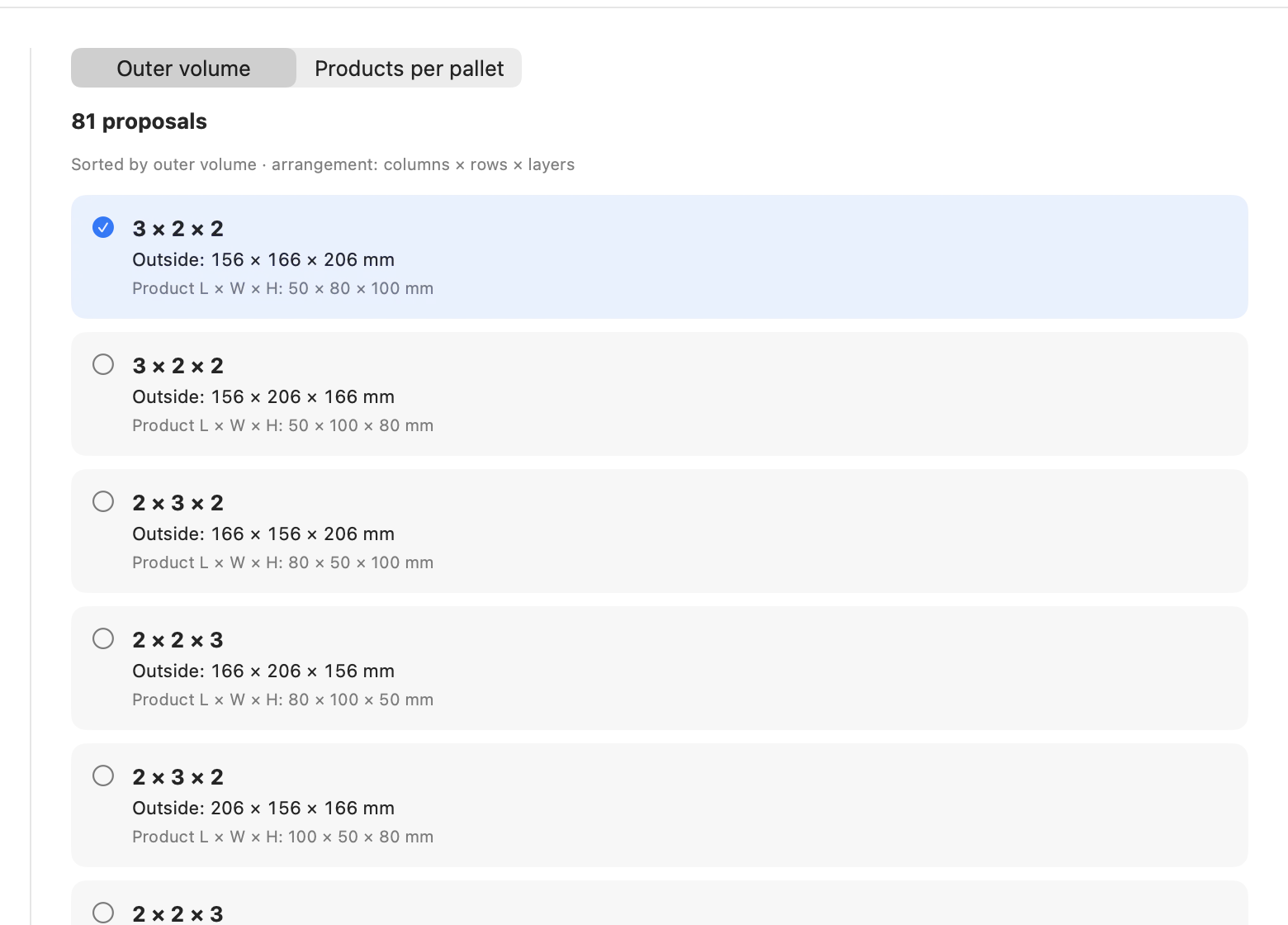
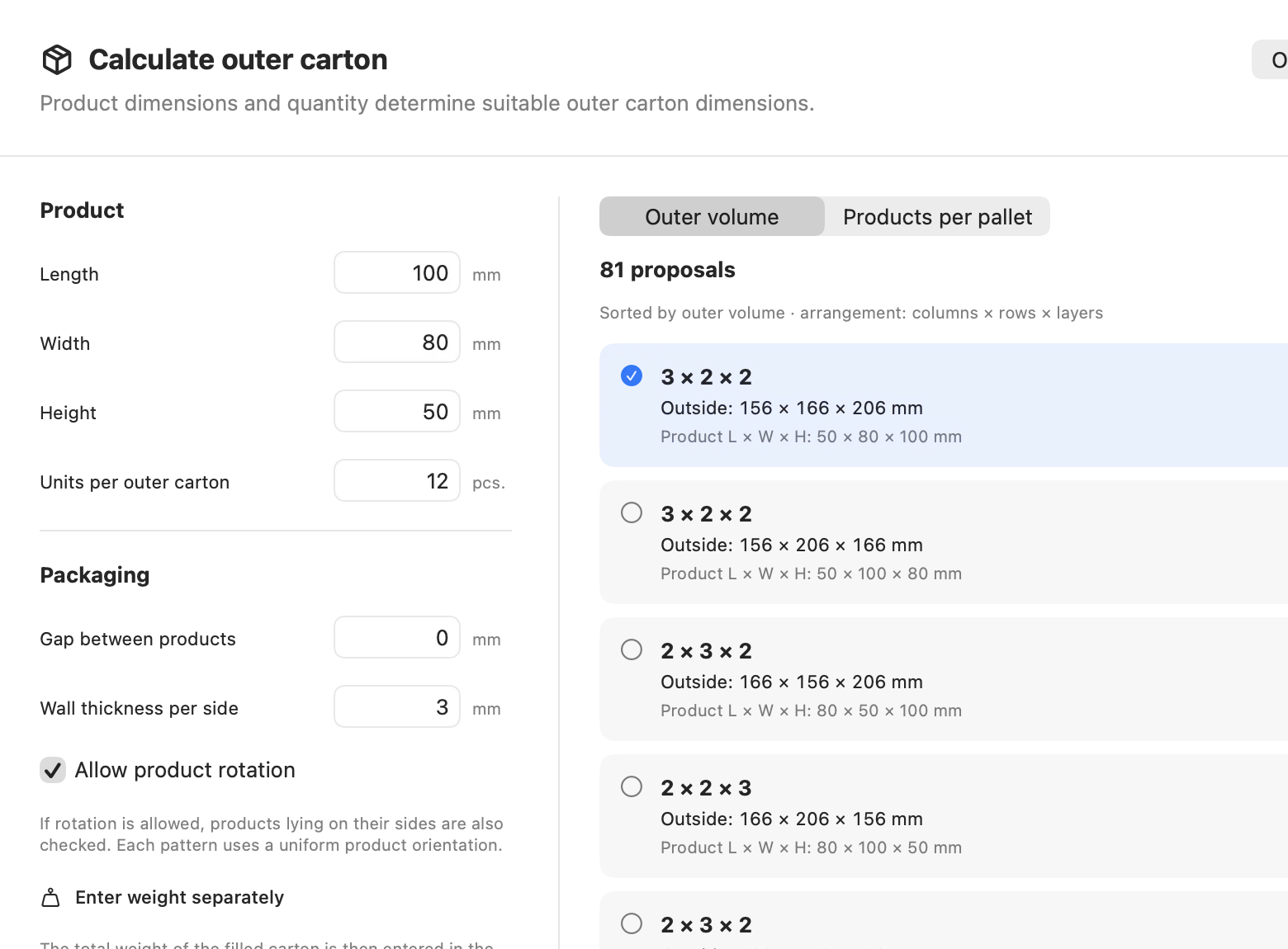
Carton designer with a transparent formula
Actual JetPallet interface.

02

Use stock cartons instead of buying new ones

Each project holds up to 20 stock cartons with name, outer size and filled weight. All of them are checked against the same product design. The check shows the grid, occupied and empty slots, and the outer size required. Example: 306 × 166 × 106 mm outside, 3 mm wall, no clearance, twelve products of 100 × 80 × 50 mm fit exactly as 3 × 2 × 2.

03

Right-sizing: vary the product dimensions

If the product itself can still change, JetPallet varies length, width and height on a grid of minimum, maximum and step. The original volume is at least preserved. For each set of dimensions it builds outer cartons and rates them by products per pallet.

Right-sizing: vary the product dimensions
Actual JetPallet interface.

04

Weigh up several goals

Unit count is not always the only thing that matters. In the carton comparison and in right-sizing, JetPallet marks the Pareto front – variants that no other variant beats on every goal – and lets you weight the goals.

Questions

Frequently asked questions.

How do I work out the size of a shipping carton?

On each axis: number of products × product size, plus (number − 1) × clearance, plus twice the wall thickness. Twelve products of 100 × 80 × 50 mm arranged 2 × 2 × 3 with 2 mm clearance and a 3 mm wall give 208 × 168 × 160 mm.

Can I check whether my product fits a box I already stock?

Yes. JetPallet checks one or up to 20 saved stock cartons against the product dimensions, unit count, wall thickness and permitted rotation, and shows the grid that fits, even if some slots stay empty.

What does right-sizing mean here?

Choosing product and carton dimensions so that as many products as possible fit on the pallet. JetPallet varies the product dimensions on a grid you define, never below the original volume, and compares the results per pallet.

Find the carton that fills the pallet

Test JetPallet free for 14 days with every feature, then USD 99 a year, with no editions. For macOS 15 or later.

Try it free

Free for 14 days · then USD 99/year

Try it free14 days freeUSD 99/year