JetPallet Try it free

Use case · Mixed orders & routes

Plan mixed pallets and multi-drop loads

A mixed pallet carries different products; a multi-drop route delivers to several consignees in turn. Both only work if the last stop goes on first and no pallet blocks the way to the doors. JetPallet works through the whole chain in one model: products → shipping cartons → pallets → vehicle, with a delivery stop for each item, a checked unloading path to the rear and a driver sheet for every stop. If you enter dangerous goods details, you also get warnings based on ADR.

1200 mm800 mm1028 mmA 600×400×300B 400×200×300C 400×300 × 12D 600×400×140E Ø200×760F 400×200×220
Mixed pallet: cartons, bottles in a tray, sacks and a lying roll. Illustration, calculated with this page’s web calculator.

Workflow

How it works in JetPallet.

  1. 1

    Enter the items

    Type items into the table, import a CSV or XLSX packing list with column mapping, or read an ERP order as JSON. For each item you can set the delivery stop and consignee, and optionally dangerous goods details.

  2. 2

    Cartonise

    Define the shipping cartons available and start the search. It runs within a set budget, can be cancelled and lists anything left unpacked separately.

  3. 3

    Palletise

    The cartons as actually packed – with outer dimensions, tare and gross masses – are distributed across pallets within your height and payload limits. Each pallet stays linked to the original order.

  4. 4

    Load the vehicle

    Loaded pallets enter vehicle planning with their real height and gross weight. Pallets inherit the stop of their items, which sets the unloading order. Exclusion areas and temperature zones apply on top.

  5. 5

    Produce the paperwork

    Export the vehicle load plan as a PDF with loading steps and a driver sheet for each stop, or as a mobile HTML view for the driver’s phone.

Why mixed orders eat so much time

With single-product loads one layer pattern does the job. A mixed order means deciding which item goes into which carton, how the cartons are spread across pallets and where each pallet stands in the truck. If items belong to different consignees they must not share a carton or a pallet – otherwise someone repacks at the first drop.

On top of that come exclusion areas in the cargo space, temperature zones and dangerous goods that cannot travel with everything. Every change to the order unpicks the whole plan. That is why every stage in JetPallet is linked to the one before: when the source changes, the next stage notices and asks for a fresh assignment.

112212
Multi-stop: load units per consignee, marked by stop. Illustration, calculated with this page’s web calculator.

What you end up with

  • Vehicle load plan PDF with loading steps and a driver sheet per stop
  • Mobile HTML load view for each vehicle
  • Pallet labels showing stop and consignee
  • CSV and JSON for cartonisation, pallets and vehicle arrangement
  • ERP result as JSON

In detail

In detail

01

Stops are never mixed

Items for different delivery stops never end up in the same carton or on the same pallet. The plan respects this, and an independent check confirms it separately. If a manual delivery plan contradicts the item data, JetPallet reports the conflict.
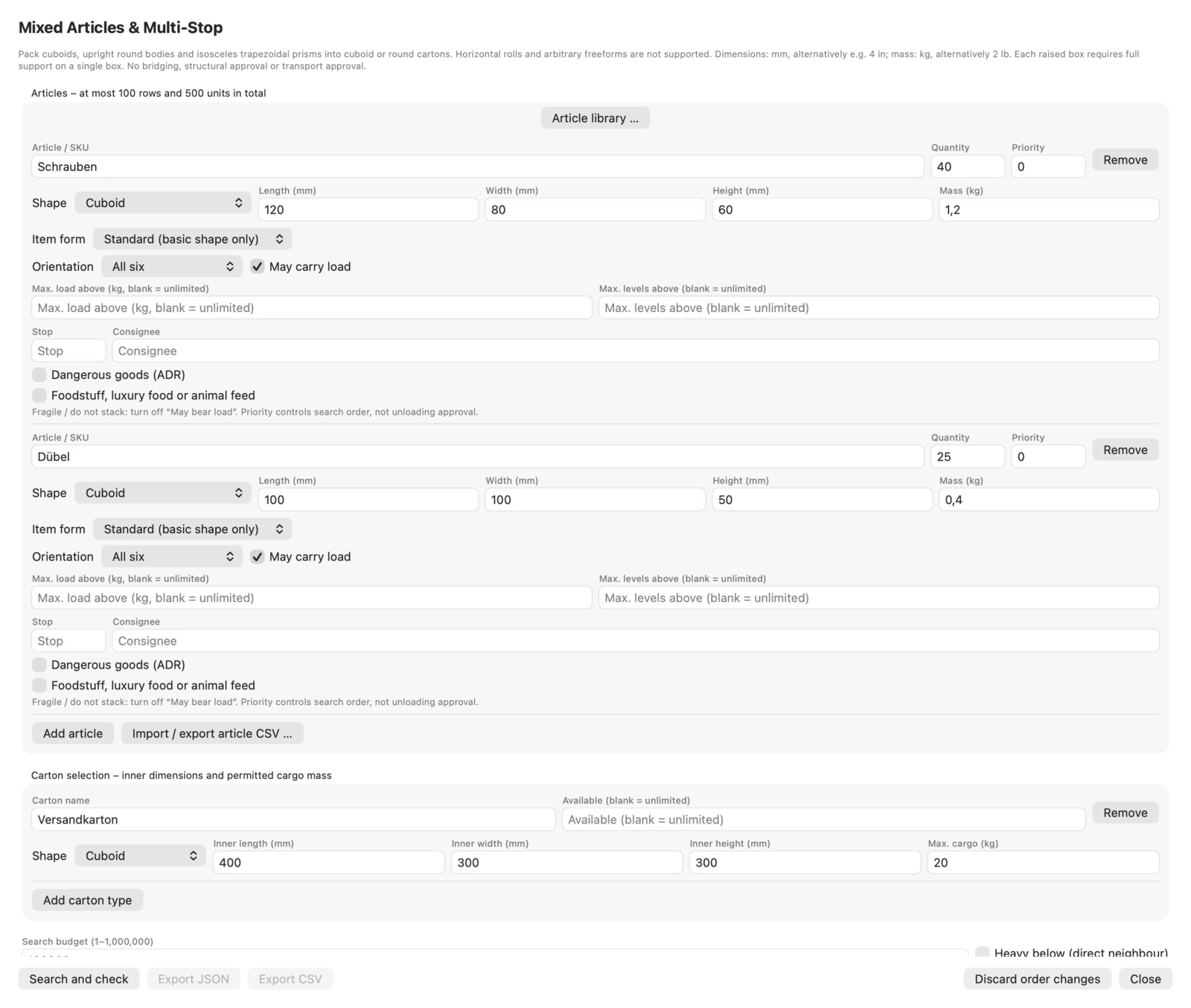

Stops are never mixed
Actual JetPallet interface.

02

Checked loading sequence

For every stop JetPallet checks that the pallets can be unloaded in a straight line to the rear without pallets for later stops or exclusion areas in the way. The loading steps in the PDF are the reverse of this checked unloading order, each with a plan view.

Checked loading sequence
Actual JetPallet interface.

03

Exclusion areas and temperature zones

Up to 50 named rectangles block parts of the cargo space, for fittings for example. Temperature zones define which pallets may go where; a pallet that fits nowhere stays visible as a remainder rather than being placed quietly elsewhere.

04

Dangerous goods notes (ADR)

For each mixed item you can enter UN number, class, labels, packing group, limited quantity, tunnel restriction code and transport category. JetPallet derives warnings from them: mixed-loading prohibitions per mixed pallet and per vehicle, notes on limited quantities and the points total under the 1,000-point rule where category and quantity are given. Class 1 with class 1 is always flagged “check by dangerous goods safety adviser”. For sea transport there are additional segregation notes based on chapter 7.2 of the IMDG Code, and for foodstuffs distance notes based on ADR 7.5.4, derived from the actual placement. These are all notes, not a packing certificate under IMDG 5.4.2.

05

Driver sheet for every stop

The driver sheet shows the consignee, the pallets to unload and the remaining load for each drop. Load plan PDF, mobile view and pallet label are available in 47 document languages; 45 of them (all except German and English) are machine-translated. The mobile view loads no external resources, with step-by-step navigation and local ticking-off.

06

Shapes, carton types and item library

Mixed items can be boxes, upright cylinders (cans, pails), upright trapezoidal prisms, bottles with neck dimensions, sacks and lying rolls – lying rolls as an enclosing box that never carries load. Each order allows up to 50 carton types and 1 to 100 delivery stops. You keep items across projects in the item library and can find them via a barcode from a photo (PNG, JPEG, HEIC) – recognition runs directly on your Mac, with no upload.

Questions

Frequently asked questions.

What is a mixed pallet?

A pallet carrying different products or carton sizes, usually for one consignee. Unlike a single-product pallet there is no uniform layer pattern; cartons have to be placed individually.

How do you load a truck with several delivery stops?

The last stop is loaded first and the first stop stands at the doors. What matters is that every pallet can be unloaded in a straight line without goods for later stops in the way. JetPallet checks exactly that and derives the loading steps from it.

Is JetPallet dangerous goods software?

No. JetPallet gives notes on ADR mixed-loading prohibitions, limited quantities and points, as well as IMDG segregation and foodstuff distances, when you enter the details. It neither checks nor approves anything; a missing warning is not a clearance.

Can I bring in orders from my ERP system?

Yes, as a JSON order following the documented schema, or as a CSV or XLSX packing list with column mapping. The result can be returned as an ERP result in JSON.

From mixed order to driver sheet

Try JetPallet free for 14 days with every feature, then USD 99 a year. For macOS 15 or later, local, with no account and no cloud.

Try it free

Free for 14 days · then USD 99/year

Try it free14 days freeUSD 99/year